Improv Prompt Generator
This online Improv Prompt Generator operates as a rapid, chance-based stimulus tool. With each activation, five interlocking prompts are produced: Character, Situation, Setting, Style, and Space. Together, these form a concise devising brief. Students are required to respond immediately, commit fully to their initial decisions, and construct a coherent scene in collaboration with a partner or small ensemble.
The central organising principle remains Character. All other elements should be interpreted as conditions that shape, test, or intensify the character’s objective.
How the Generator Functions
Activate the spin
Select the SPIN control to generate a new prompt combination.
Interpret the brief
Treat the five outcomes as a unified framework. Visualise how they intersect rather than addressing them in isolation.
Lock a reel
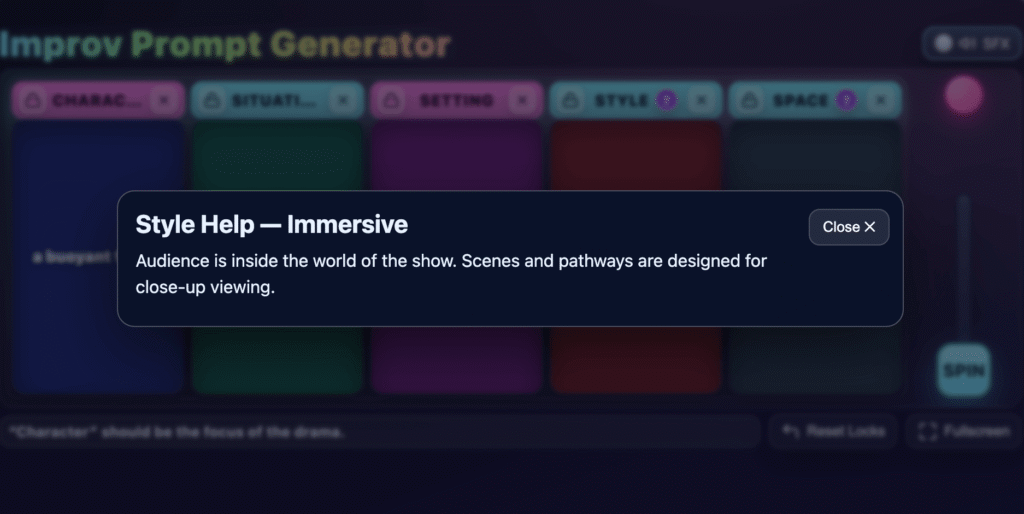
Use the padlock icon (upper-left of a reel) to retain a selected prompt for subsequent rounds.
Disable a reel
Select the X icon (upper-right) to temporarily remove a reel from play. A blurred display indicates it is inactive.
Access guidance
On the Style and Space reels, select the ? icon to view concise explanatory notes appropriate for classroom use.
Fullscreen mode
Engage Fullscreen to reduce distraction. Exit via Esc or by toggling the control again.
Sound effects
Audio feedback can be enabled or disabled on desktop devices. Mobile and tablet versions operate silently to ensure stability.
Reset all locks
Use the Reset function to return all reels to an unlocked state.
Immediate Improvisation Strategies
- Establish the character’s objective at once; allow the situation to disrupt or complicate that objective.
- Use the specified space configuration to determine staging choices, audience relationship, and entrances/exits.
- Select two or three conventions from the stated style and apply them deliberately and consistently.
- Keep scenes concise and structured around a discernible turning point.
- Prioritise playable action over explanation.
Pedagogical Rationale
This generator is structured to support constraint-led improvisation. By narrowing available choices, it reduces hesitation while increasing clarity of intention. Each spin produces a compact brief that foregrounds:
- Objective-driven performance
- Intentional blocking
- Visible stylistic decisions
- Active listening and collaborative construction
It is adaptable as a warm-up, a rotation-based timed activity, or as the foundation for extended devising work.
Suggested Classroom Applications
1. Short Rotations
Pairs or trios perform 1–2 minute improvisations from a single spin.
2. Iterative Development
After each round, groups retain one reel and regenerate the remaining four to refine or evolve the scene.
3. Scaffolded Complexity
Disable Style or Space for introductory classes; progressively reintroduce them to increase conceptual demand.
4. Whole-Class Demonstration
Project a single spin. Invite rapid student suggestions and guide choices towards clarity of character and spatial awareness.
5. Extended Improvisation
Allocate 10–15 minutes for rehearsal from one generated brief, followed by performance and structured reflection.
Performance Indicators
These criteria may be adapted as an assessment checklist:
- Character clarity – Objectives and obstacles are evident; status shifts are justified.
- Spatial awareness – Blocking aligns with the designated configuration; the audience relationship is deliberate.
- Stylistic coherence – At least two conventions are identifiable and sustained.
- Collaborative responsiveness – Offers are accepted and extended constructively.
- Structural precision – The scene contains a clear escalation or shift.
- Vocal and physical control – Performance is audible, focused, and safe.
Reflection and Evaluation
Consider the following post-performance prompts:
- How did the specified space influence staging decisions?
- Which stylistic convention proved most effective?
- In what way did the situation alter the character’s objective?
- Where did the turning point occur?
Still images or tableaux may be captured at the conclusion of scenes to document blocking choices for future development.
Differentiation and Accessibility
- Reduce complexity by pre-locking Character or disabling Style.
- Provide sentence stems to support constructive offers (“What if…”, “Because…”, “This changes…”).
- Ensure safe navigation of space configurations; adjust proximity and vocal expectations as required.
- Encourage consultation of explanatory notes on Style and Space where conceptual support is needed.
Practical Considerations
- Encourage Fullscreen mode to minimise distraction.
- Audio feedback is optional on desktop and disabled on mobile by design.
- Reinforce the foundational instruction: Character remains the organising centre of the improvisation.
Educational Value
The tool operates effectively because it:
- Replaces the “blank page” with a structured stimulus.
- Makes abstract theatrical concepts—particularly style and spatial form—observable and measurable.
- Cultivates transferable devising habits, including objective clarity, status negotiation, and purposeful staging.
By repositioning the generator within a dedicated digital tools environment, it functions not merely as an activity but as a repeatable, curriculum-aligned devising mechanism suited to middle and senior drama classrooms.